
Tradie Website vs Booking Front Door: What Does Your Business Actually Need?
A traditional tradie website explains the business. A booking Front Door guides the customer towards a qualified enquiry, quote, booking, deposit or review. Many businesses do not need to choose between them, but they should understand the different jobs each one performs.
BrandUte publishes this guide and sells a managed booking Front Door. A traditional website may be the better option for some businesses, and many established businesses will gain the most value by using a website and Front Door together. BrandUte does not guarantee search rankings, traffic, enquiries or bookings.
A website helps customers research you. A Front Door helps them act.
When customers need depth, proof and information
- You offer many services requiring detailed explanations.
- You want substantial search-focused content.
- You need project galleries, case studies and team profiles.
- You serve several customer types or industries.
- You need recruitment, resources or broader company information.
When customers find you but fail to take the right next step
- Your existing page has a vague contact form.
- You receive enquiries without enough job information.
- You want to check location, service type or urgency.
- You need booking, quote, callback or deposit pathways.
- You want a managed setup rather than another DIY website project.
When the website builds confidence and the Front Door converts it
- The website handles research and search visibility.
- The Front Door handles qualification and customer action.
- Service pages link to the appropriate journey.
- Google, campaigns and QR codes can use focused destinations.
- The existing website does not need to be replaced.
“I need a website” is often the first technology decision made by a small service business.
That decision makes sense. Customers want to confirm that the business is real, understand what it does, see examples of its work and decide whether it appears trustworthy.
The problem is that a website and a customer-conversion journey are not automatically the same thing.
A website can look professional and still leave the customer asking:
- Does this business handle my type of job?
- Does it cover my suburb?
- Can I book now?
- Should I ask for a quote?
- What information does the tradie need?
- Will someone call me back?
- Is the booking actually confirmed?
A booking Front Door is designed around those action questions.
A website is usually built around what the business wants to say. A Front Door is built around what the customer needs to do next.
What is a tradie website?
A tradie website is the broader online home of the business.
It will commonly include:
- a homepage;
- individual service pages;
- an About page;
- areas serviced;
- project photographs or galleries;
- reviews and testimonials;
- licence, insurance or qualification information;
- frequently asked questions;
- contact information; and
- a contact or quote-request form.
A good website helps a potential customer investigate the business. It can answer detailed questions, demonstrate experience and give search engines substantial content to understand.
It may also support audiences beyond immediate customers, including:
- potential employees;
- commercial partners;
- suppliers;
- property managers;
- builders and subcontractors;
- media or community organisations; and
- people researching the business before requesting work.
The weakness is not that websites are ineffective. The weakness is that many small-business websites finish with a generic contact form and expect the customer to decide what should happen next.
What is a booking Front Door?
A booking Front Door is a focused customer journey behind a memorable business domain.
It does not try to present every piece of information about the company. Its main purpose is to identify what the customer needs and guide them towards the appropriate next step.
A BrandUte Front Door can include:
- a selected Australian business domain;
- professional domain-based email;
- a mobile-first public business page;
- services and service areas;
- customer-friendly job questions;
- postcode or location checks;
- qualification and availability rules;
- quote-request pathways;
- booking or arrival-window requests;
- callback pathways;
- deposit or payment steps where enabled;
- review-request journeys;
- a business portal; and
- guided setup, hosting and launch testing.
The customer may reach the Front Door through:
- Google Business Profile;
- a website call-to-action;
- Facebook or another social profile;
- paid advertising;
- a referral;
- a vehicle or job-site sign;
- an invoice or email signature; or
- a QR code.
A Front Door does not guarantee that the business will receive traffic. It improves the path available after traffic has been earned.
A website is an information destination. A Front Door is an action journey.
The website answers: “Why should I trust this business?” The Front Door answers: “What do I do now?”
| Area | Traditional tradie website | Booking Front Door |
|---|---|---|
| Primary purpose | Explain the business and provide a broad online presence | Guide customers towards the appropriate business action |
| Content depth | Can contain detailed services, projects, articles, team information and resources | Keeps information focused on the current customer decision |
| Search visibility | Better suited to publishing substantial search-focused content across many pages | Can support focused campaigns and direct-intent searches but is not a replacement for a complete content strategy |
| Customer action | Often relies on calls, email links or a general contact form | Provides booking, quote, callback, deposit or review pathways |
| Job questions | Usually general unless custom forms have been created | Configured around services, location, timing and job requirements |
| Qualification | Commonly completed manually after the enquiry arrives | Can apply service, area, urgency and availability checks before the next step |
| Booking | May link to or embed a separate booking platform | Makes the booking or request pathway central to the experience |
| Setup model | May be DIY, agency-built or independently managed | BrandUte uses guided onboarding and managed configuration |
| Best use | Research, credibility, content and broad company information | Qualification, conversion and focused customer action |
| Can they work together? | Yes. Website pages can build confidence and search visibility, while their calls to action direct customers into the relevant Front Door journey. | |
A Front Door should not be forced to replace every useful website function.
A website gives the business room to explain and demonstrate.
- Separate pages for each important service
- Suburb or service-area information
- Project galleries and case studies
- Detailed frequently asked questions
- Articles and practical guides
- Commercial, residential and specialist content
- Company history and team information
Customers may need more evidence before they are ready to enquire.
- Licences and qualifications
- Insurance information
- Past-project examples
- Customer reviews and testimonials
- Warranty or workmanship information
- Supplier and product details
- Employment and partnership information
A large renovation company, commercial contractor or specialist trade may need this depth. Customers may spend considerable time researching before requesting a quote.
A complete website is usually the stronger foundation when the business needs dozens of pages, substantial educational content or several audiences.
The Front Door can then be connected to the calls to action throughout that site.
A Front Door reduces the gap between interest and a useful customer request.
The customer receives a clear path.
- Choose the service required
- Confirm the location is supported
- Explain the job in useful terms
- Supply photographs where appropriate
- Choose a quote, booking or callback path
- Understand whether a deposit is required
- Receive a clear confirmation or outcome
The business receives better information before responding.
- Service and customer details remain together
- Unsupported locations can be identified early
- Urgency can be handled consistently
- Vague one-line messages are reduced
- Suitable customers can access the right next step
- Quotes and bookings can be followed through
- Completed customers can enter a review journey
This is particularly useful for traffic arriving with immediate intent:
- someone clicking “Website” from Google Business Profile;
- a referred customer typing the domain from a text message;
- someone scanning a QR code on a vehicle;
- a customer responding to an advertisement;
- a property manager needing to submit a specific job request; or
- a completed customer being asked to leave a review.
Many websites finish just as the important customer work begins.
A form containing only name, email, phone and message asks the customer to decide what information matters. It also leaves the business to manually qualify every request after it arrives.
The service is unclear
“Need someone to have a look” may not reveal whether the request fits the services actually offered.
The location is missing
The business may spend time responding before learning that the job is outside its service area.
Urgency is misunderstood
A same-day request, emergency and flexible future job may all arrive through the same undifferentiated form.
The next step is uncertain
The customer may not know whether the request has been accepted, booked, sent for review or placed in a general inbox.
The problem is not that a contact form collects too little text. The problem is that it often provides no structured customer decision.
The website can build confidence while the Front Door converts intent.
An established tradie does not need to delete a useful website to adopt a BrandUte Front Door.
Traditional website
Used when the customer wants to research the business and its work.
- Detailed services
- Project galleries
- About and team information
- Articles and guides
- Commercial and specialist information
- Trust and credibility content
BrandUte Front Door
Used when the customer is ready to take the next step.
- Service selection
- Location check
- Qualification questions
- Quote request
- Booking request
- Deposit or payment
- Review journey
The website does not need to become the booking system. It needs to send ready customers into the right booking or enquiry journey.
The right architecture depends on the current stage of the business.
Front Door without a large website
Suitable for a small or new service business that needs a professional public destination and customer journey without commissioning a substantial website.
- Business domain and email
- Public business page
- Services and service areas
- Qualification and booking pathways
- Links for Google, social media and signage
Existing website plus BrandUte Front Door
Suitable for an established business whose website provides useful information but whose calls to action and contact forms do not convert consistently.
- Retain current website and search visibility
- Keep project galleries and service pages
- Connect primary calls to action to BrandUte
- Use focused Front Door links in campaigns
- Avoid rebuilding useful content
Full website with several focused Front Doors
Suitable for a larger business with distinct services, locations, customer types or campaigns requiring different customer journeys.
- Comprehensive main website
- Separate service and location content
- Focused campaign destinations
- Different qualification rules by service
- Different next steps for different customers
See how the website and Front Door perform different jobs.
Painter with an existing website
The website demonstrates projects. The Front Door collects the information required to assess a new job.
- The customer finds an exterior-painting page through Google.
- They review project examples and preparation information.
- The “Request a quote” button opens the BrandUte Front Door.
- The customer confirms the property type, postcode and scope.
- They provide timing, photographs and contact details.
- The painter receives a structured request rather than a vague contact-form message.
Emergency plumber with a focused Front Door
The customer needs a quick action path rather than several pages of research.
- The customer clicks the business from Google Business Profile.
- The Front Door asks what has happened and where the job is located.
- It checks whether the suburb and service type are supported.
- The customer confirms urgency and contact information.
- A suitable customer receives the configured emergency next step.
- The business receives the relevant details before responding.
Pest-control business with standard bookings
The website explains treatments while the Front Door handles service selection and booking.
- The customer reads about termite and general pest services.
- They choose “Book pest treatment.”
- The Front Door identifies the pest and property type.
- The postcode and preferred timing are collected.
- The customer continues into the appropriate booking or request pathway.
- Confirmation and follow-up are handled through the configured journey.
Referred customer using a vehicle domain
A memorable domain gives the customer a simpler entry point than a long website address.
- A neighbour recommends the business.
- The customer types the short domain seen on the business vehicle.
- The Front Door confirms the business and services.
- The customer explains the job and supplies the required details.
- They request the appropriate quote, booking or callback.
- The business receives the enquiry under its own brand.
Which option is the more logical starting point?
| Business situation | Likely starting point |
|---|---|
| I have no professional online presence | A BrandUte Front Door may provide a faster focused launch |
| I need dozens of service and project pages | A complete website |
| My existing website looks good but enquiries are vague | Keep the website and add a Front Door |
| Most customers come through referrals and Google Business Profile | A focused Front Door may be the highest-priority conversion asset |
| Customers need substantial research before requesting work | Website first, with a Front Door connected to its calls to action |
| I need customers to upload details before I quote | Booking Front Door |
| I want to publish regular articles for search visibility | Website with a Guides or Articles section |
| My website address is too long for signage | Use a memorable Front Door domain alongside the current website |
| I use several disconnected booking and payment links | Use the Front Door as the central public customer destination |
| My website and booking journey already work extremely well | A new Front Door may not add enough value |
Ten questions to identify the real gap.
Do customers need more information or a clearer action?
How do most customers currently discover the business?
Does the current website generate useful enquiries?
Which details are usually missing from customer requests?
Do different services require different next steps?
Can customers book immediately, or must the job be reviewed first?
Is the current domain memorable enough for vehicles and referrals?
Does the business need substantial search-focused content?
Who will maintain the website and customer journeys after launch?
Would keeping the existing website and improving its calls to action solve the problem?
PaintCrew demonstrates the action layer described in this guide.
The public page introduces the business and guides the customer into service selection, qualification and booking. The supporting screenshots show what happens after the request is submitted.
The public customer Front Door
Customers see the business, choose a service, explain the job and enter the appropriate qualification or booking journey.
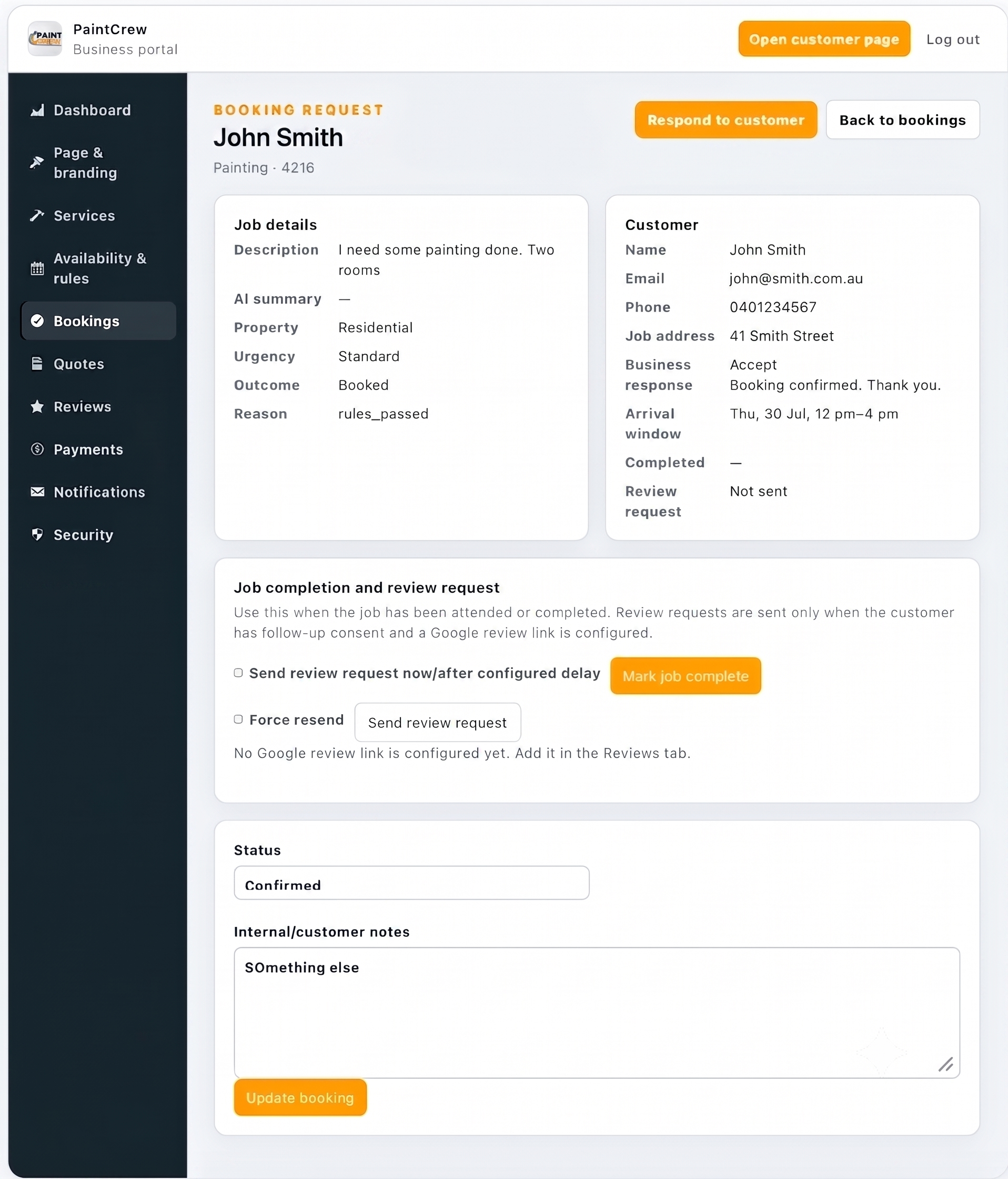
Qualified booking request
Customer details, job information, qualification and booking responses remain together.
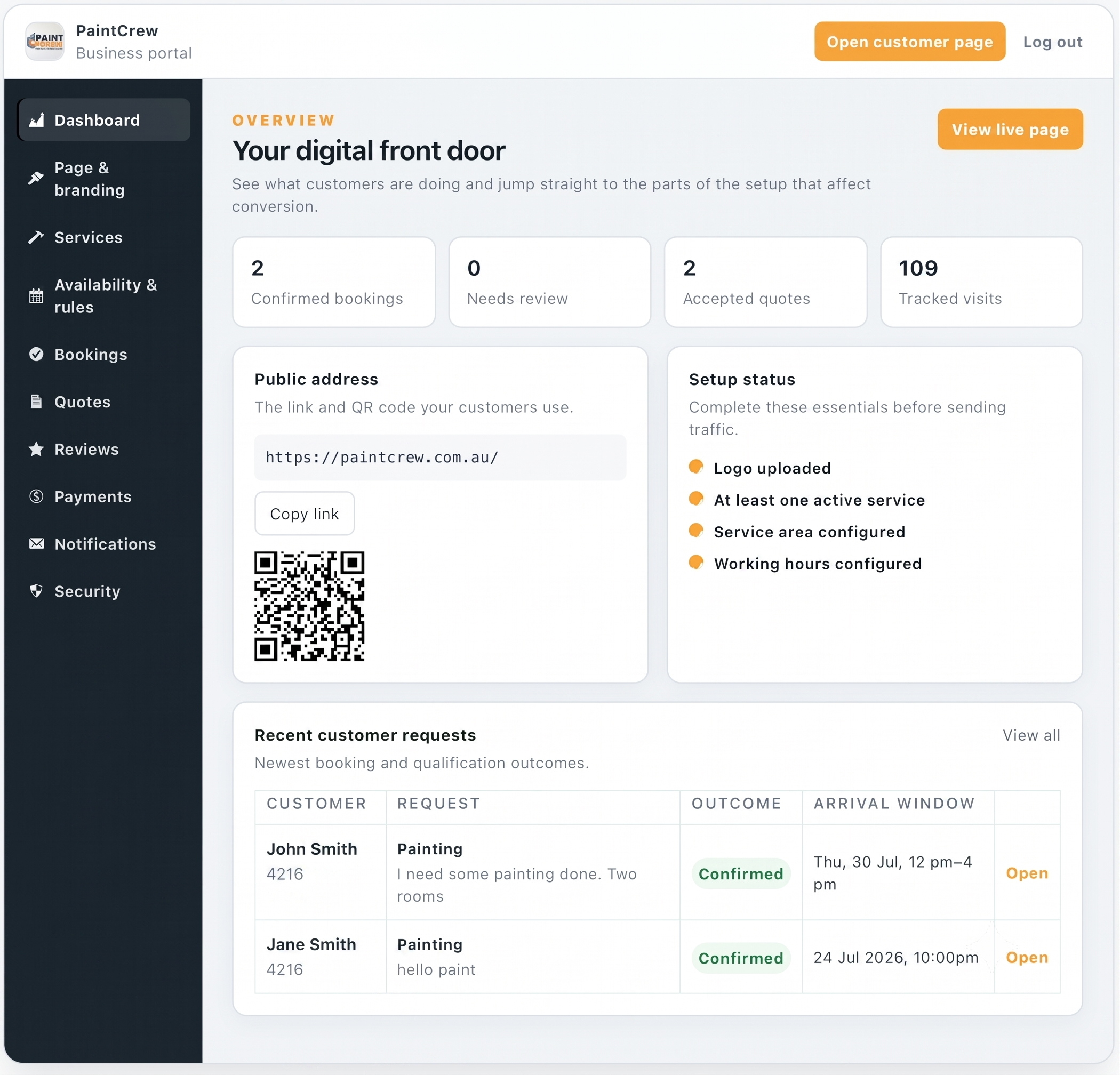
Business portal
The business can see bookings, quotes, visits, setup status and recent customer requests.
Try the customer-facing journey.
Open PaintCrew inside this article or visit the demonstration in a separate browser tab.
PaintCrew is a BrandUte demonstration using sample customer and transaction information.
Tradie website and Front Door questions
Does BrandUte replace a tradie website?
Not necessarily. BrandUte can provide the primary public destination for a small business without an existing site, but it can also work alongside a traditional website. The website can retain detailed content while its calls to action send ready customers into the Front Door.
Is a booking Front Door just a landing page?
No. A landing page commonly presents a focused marketing message. A BrandUte Front Door also connects that public presentation to service selection, customer questions, qualification rules and pathways for bookings, quotes, deposits, payments or reviews.
Can a Front Door help my Google rankings?
BrandUte does not guarantee search rankings. A complete website with useful, original service and location content may be more suitable for a broad search-visibility strategy. A Front Door is primarily focused on converting the traffic that reaches it.
Can I keep my existing website?
Yes. Existing website buttons can link to the BrandUte Front Door, or selected traffic sources can be sent directly to it. The current website does not need to be removed when it still provides useful content and credibility.
Which link should I place on Google Business Profile?
Use the destination that best matches what a Google visitor should do. A broad website may be suitable where customers need research. A focused Front Door may be stronger where the visitor is usually ready to request a quote or booking. The choice should be tested against actual customer behaviour.
Do I still need service pages?
Service pages remain valuable when customers need detailed explanations, examples and confidence before enquiring. Their calls to action can direct customers into service-specific Front Door journeys.
Is BrandUte suitable for a new business?
It may be. A new business can use BrandUte to establish a domain, professional email and customer journey without first building a large website. BrandUte will not create customer demand by itself, so the business still needs marketing, referrals, reputation or another source of traffic.
Does BrandUte guarantee bookings?
No. Results depend on traffic, reputation, pricing, availability, responsiveness, customer demand and the quality of the service. BrandUte provides a more structured path from customer interest to the appropriate action.
What should I place on my vehicle signage?
Use a domain that is short enough to read and remember quickly. It can direct customers to the BrandUte Front Door while the longer traditional website continues operating separately.
When is a Front Door unnecessary?
A new Front Door may be unnecessary when the existing website, forms and booking system already provide a clear, well-performing customer journey. Adding another layer should solve a specific conversion problem rather than create more complexity.
Continue comparing the different approaches.
BrandUte vs hipages
Compare marketplace job leads with enquiries arriving through the business’s own branded customer journey.
Read the comparison →BrandUte vs ServiceM8
Compare a managed public Front Door with a complete field-service and job-management platform.
Read the comparison →BrandUte and ServiceM8 together
See how BrandUte can manage the public entry while ServiceM8 manages scheduling, job cards and field operations.
Read the workflow guide →A website and booking Front Door are not competing versions of the same thing.
Choose a traditional website when the business needs detailed information, project proof, search-focused content and a broad online company presence.
Choose a booking Front Door when the immediate problem is converting existing customer attention into qualified enquiries, bookings, quotes, deposits or reviews.
Use both when the website should establish trust and the Front Door should manage the customer action that follows.
An existing website does not need to be discarded merely because its contact form is weak. Connecting the right calls to action to a focused Front Door may be the more practical improvement.
The website explains why the customer should choose you. The Front Door makes it easier for them to do it.