
How to Turn Google Business Profile Visits Into Bookings
Google Business Profile can place a tradie in front of a local customer at the moment they need help. The next challenge is turning that visibility into a qualified request, clear next step and confirmed job.
BrandUte publishes this guide and sells a managed customer Front Door. Google Business Profile does not guarantee traffic, leads or bookings, and BrandUte does not guarantee those outcomes either. Results depend on local demand, profile visibility, reviews, reputation, pricing, availability, customer experience and the business’s response.
Google earns the customer’s click. Your destination must earn the booking.
Make the profile trustworthy and accurate
- Use the correct business identity and category.
- Keep hours, phone details and service areas current.
- Show relevant photographs and completed work.
- Build a consistent flow of genuine customer reviews.
- Make the services offered easy to understand.
Send the customer to the right destination
- Avoid sending every visitor to a vague homepage.
- Use a focused website or booking link where appropriate.
- Match the destination to the customer’s likely intent.
- Offer booking, quote or callback paths according to the job.
- Make the page fast and clear on mobile.
Measure the journey beyond the Google click
- Review calls, website clicks, searches and directions.
- Tag the destination link for analytics.
- Track completed forms, quote requests and bookings.
- Measure qualified requests rather than page visits alone.
- Compare booked work with the traffic source.
A customer searching for a local tradie may never begin on the business’s website.
They may first encounter:
- the business name;
- its overall rating and reviews;
- opening hours;
- telephone number;
- service location;
- photographs;
- business description;
- website link; and
- an eligible booking or appointment link.
This makes Google Business Profile an important local storefront on Google Search and Maps.
However, profile visibility is only the beginning.
A customer who clicks through but cannot quickly confirm that the business handles the job, covers the location or offers a clear next step may return to Google and choose another provider.
The profile creates the opportunity. The destination determines whether that opportunity becomes a useful customer action.
Google Business Profile helps local customers discover and evaluate the business.
Google describes Business Profile as a local storefront on Search and Maps for businesses that meet customers in person, either at a fixed location or within a service area.
Depending on the business and profile eligibility, customers may be able to:
- view the business on Search or Maps;
- read reviews;
- view photographs;
- check opening hours;
- call the business;
- request directions;
- visit its website;
- review services; or
- follow an appointment or booking link.
Google Business Profile does not complete every customer journey by itself.
It can introduce the customer and present available actions, but the business still needs an effective destination and response process.
Google Business Profile chat and call-history features were removed in 2024. Customers can still call the displayed number and use website or eligible booking links, but businesses should not rely on the retired profile chat function as their enquiry workflow.
Official source: About Google Business ProfileReduce the number of decisions between the Google search and the booking.
Google Business Profile
The customer confirms that the business appears relevant, credible and available.
- Business identity
- Reviews and rating
- Services
- Hours
- Photographs
- Phone and links
Focused customer Front Door
The destination recognises the customer’s likely intent and guides them towards the right next step.
- Choose the service
- Confirm the postcode
- Explain the job
- Upload useful details
- Request a quote or booking
- Receive a clear outcome
Business response and job progression
The business receives useful information, confirms the next step and progresses the customer through the job.
- Review request
- Confirm booking
- Prepare quote
- Collect deposit
- Complete work
- Request review
Fix trust and accuracy before trying to optimise conversion.
Accurate business identity
Use the genuine business name and keep the profile consistent with the destination, signage and customer communications.
Correct primary category
Select the category that most accurately reflects the core service rather than trying to describe every possible job in the business name.
Current hours and contact details
Avoid creating customer expectations that the business is available when nobody is able to respond.
Clear service area
Make the service coverage understandable and repeat the relevant location rules on the customer destination.
Useful photographs
Show real work, vehicles, staff and completed outcomes rather than relying entirely on generic stock imagery.
Genuine reviews
Build a consistent review process and respond professionally without manufacturing or incentivising misleading feedback.
Relevant services
Help customers understand what the business does before they click through or call.
Working destination links
Test the website and eligible booking links regularly, especially after changing domains, booking services or page structure.
The best link depends on what the Google customer is ready to do.
| Destination | When it may work well | Potential weakness |
|---|---|---|
| Traditional homepage | Customers need to research several services, projects, the team and business credentials. | The next action may be buried among navigation, company content and a generic contact form. |
| Service page | The customer is likely searching for one defined service and needs detailed information before enquiring. | A general profile link cannot automatically know which service every visitor needs. |
| Contact page | The business only needs a simple message and has a reliable process for qualifying each request manually. | Name, phone and message fields often produce vague enquiries and unclear customer expectations. |
| External booking system | The service can be priced, timed and scheduled consistently without manual review. | Complex jobs may not be suitable for immediate booking, and the customer may see little business context before entering the form. |
| Booking Front Door | Customers need to choose between quote, booking, callback, deposit or another service-specific pathway. | It still needs customer traffic and does not replace every detailed website or job-management function. |
Do not ask, “Which page do we already have?” Ask, “What should this local customer be able to do after clicking?”
Use each link for the customer action it is designed to support.
Best for a broader customer Front Door
The main website link can present the business and guide customers towards several possible actions.
- Review services and service areas
- Choose a quote, booking or callback pathway
- Explain a complex job
- Upload photographs or supporting information
- Read important business information
- Continue to another booking system where appropriate
Best for customers ready to book a suitable service
Eligible businesses can add booking links directly to their Business Profile, including links to a supported provider or their own valid booking destination.
- Direct access to appointment selection
- Useful for repeatable services
- Can reduce steps for high-intent customers
- Multiple eligible links may be added
- A preferred link may be selected
- Eligibility and available link types can vary
Google currently allows eligible Business Profiles to add multiple business links within a supported category and to mark one as the business-preferred link.
The link must represent the business accurately, lead to a valid destination and comply with Google’s business-link policies.
A business with both simple and complex jobs may use:
- the main website link for the broader BrandUte customer Front Door; and
- an eligible booking link for services suitable for immediate appointment selection.
Official source: Business-link policies and guidelines
What the customer should experience after leaving Google.
Google Business Profile visitors are commonly on mobile and may already be comparing several providers. The destination must establish relevance quickly and make the next step obvious.
Confirm that the customer reached the correct business
Repeat the recognisable business name, core service and location context instead of opening with vague marketing copy.
Show the main customer actions immediately
Do not make a ready customer search the navigation for a quote, booking or telephone action.
Let the customer choose the service
Service selection improves relevance and allows the next questions to match the work rather than showing one long generic form.
Check the service area early
A postcode check can prevent both the customer and business from completing a long process for an unsupported location.
Ask only questions that affect the next step
Collect enough information to assess the job without turning the mobile form into a technical questionnaire.
Match the action to the type of job
A repeatable service may be suitable for immediate booking, while a complex job may require a quote request, photographs or inspection.
Make the confirmation unambiguous
Tell the customer whether the job is confirmed, awaiting review, waiting for a quote or subject to a callback.
Respond consistently
A well-designed form cannot compensate for requests sitting unanswered. Set a realistic customer expectation and make the request visible to the business.
Profile traffic is often lost after the click, not before it.
Sending every visitor to a generic homepage
The customer must search again for services, locations and the correct next action.
Using only name, email and message
The business receives insufficient information and must manually restart the qualification process.
Treating every service as instantly bookable
Some jobs require manual review, site information, photographs or a custom quote before scheduling.
Asking too many questions
An exhaustive technical form may improve data completeness while reducing the number of customers who finish it.
Hiding service-area limits
Customers may complete the entire journey before learning the business does not cover their suburb.
Giving no response expectation
The customer does not know whether to wait, call another tradie or assume the request was lost.
Measuring clicks but not jobs
Website clicks are useful, but they do not reveal whether the customer submitted, qualified or became paid work.
Leaving outdated links active
Old domains, retired booking pages and broken third-party links can waste high-intent profile traffic.
Measure Google interaction and the customer journey separately.
Google Business Profile performance can provide information such as:
Searches and views
Understand how often the profile appears and which search terms customers use to find it.
Calls and directions
Review call-button interactions and direction requests where those metrics apply to the profile.
Website clicks
See how many customers click the website destination from the Business Profile.
Completed bookings
Google’s booking-completion metric requires bookings managed through a supported booking provider.
Track direct Front Door visits with campaign parameters
A tagged destination URL can help analytics distinguish traffic coming from the Business Profile.
https://yourbusiness.com.au/?utm_source=google&utm_medium=organic&utm_campaign=business_profile
Keep the naming consistent. Google Analytics recognises campaign parameters such as:
- utm_source: the referring source;
- utm_medium: the marketing medium;
- utm_campaign: the campaign or placement name; and
- utm_content: an optional distinction between links.
Do not judge performance only by the number of clicks. Track:
- Front Door visits from Google Business Profile;
- service selections;
- postcode pass and fail rates;
- forms started and completed;
- qualified enquiries;
- booking requests;
- confirmed bookings;
- quotes accepted;
- deposits or payments; and
- completed-job value where available.
Google also documents an option to connect eligible Business Profiles with Google Analytics so profile interactions can be viewed alongside website and application data.
Official source: Business Profile performanceOfficial source: Google Analytics campaign URL parameters
Official source: Connect Business Profile to Google Analytics
Estimate the commercial value of improving the post-click journey.
Enter the monthly number of Google Business Profile website visitors, the current conversion rate, a realistic improved rate and the average gross profit from a booked job.
This is a scenario calculator rather than a forecast or guarantee. Actual results depend on customer demand, traffic quality, service, pricing, availability and business response.
The correct Google-to-booking journey depends on the work.
Painter
Most projects require qualification before a final quote.
- Customer clicks from Google Business Profile.
- Selects interior, exterior or commercial painting.
- Confirms property postcode and type.
- Provides scope, timing and photographs.
- Requests a quote or inspection.
- Receives a clear response expectation.
Emergency plumber
Speed and service-area qualification matter most.
- Customer sees current availability and telephone action.
- Selects the urgent problem type.
- Confirms the job postcode.
- Provides a short description and contact information.
- Receives the configured urgent response or callback pathway.
- Business receives the relevant details immediately.
Cleaning service
Repeatable services may support more direct booking.
- Customer selects residential or commercial cleaning.
- Chooses property size and service frequency.
- Confirms the supported suburb.
- Receives an estimate or configured booking path.
- Selects a time or requests confirmation.
- Completes deposit or payment where applicable.
Electrician
Different work types may need different outcomes.
- Customer selects repair, installation or urgent fault.
- Confirms residential or commercial property.
- Provides postcode and timing.
- Uploads a photograph where useful.
- Standard work receives a booking pathway.
- Complex work receives a qualified quote or callback path.
PaintCrew demonstrates what can happen after the Google click.
The customer arrives under the business’s own domain, selects the required service, supplies useful job information and enters the appropriate booking or quote journey.
The public customer Front Door
A Google Business Profile website click can lead to one focused destination for services, qualification and customer action.
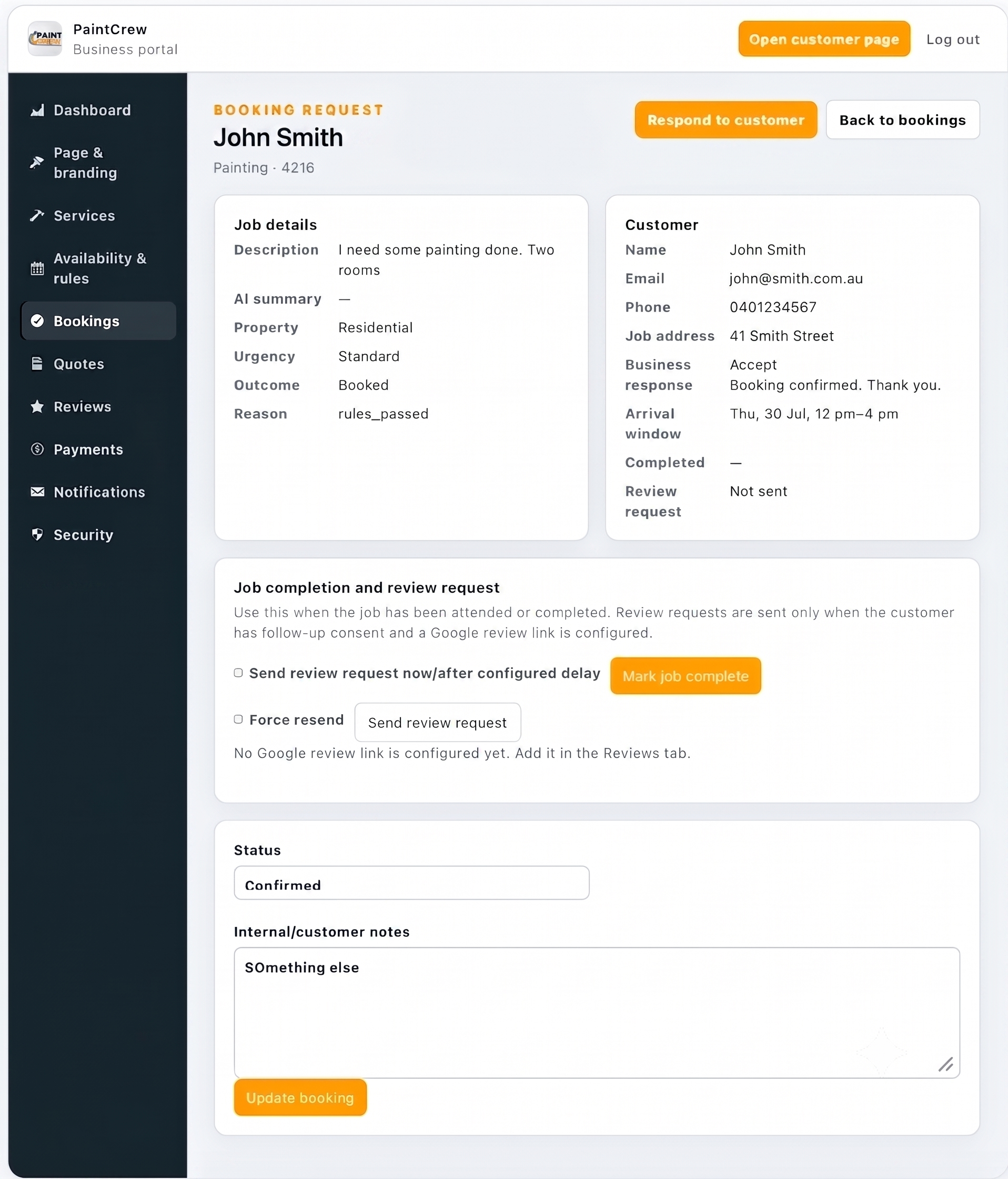
Qualified booking request
The business receives customer details, location, service and job information together.
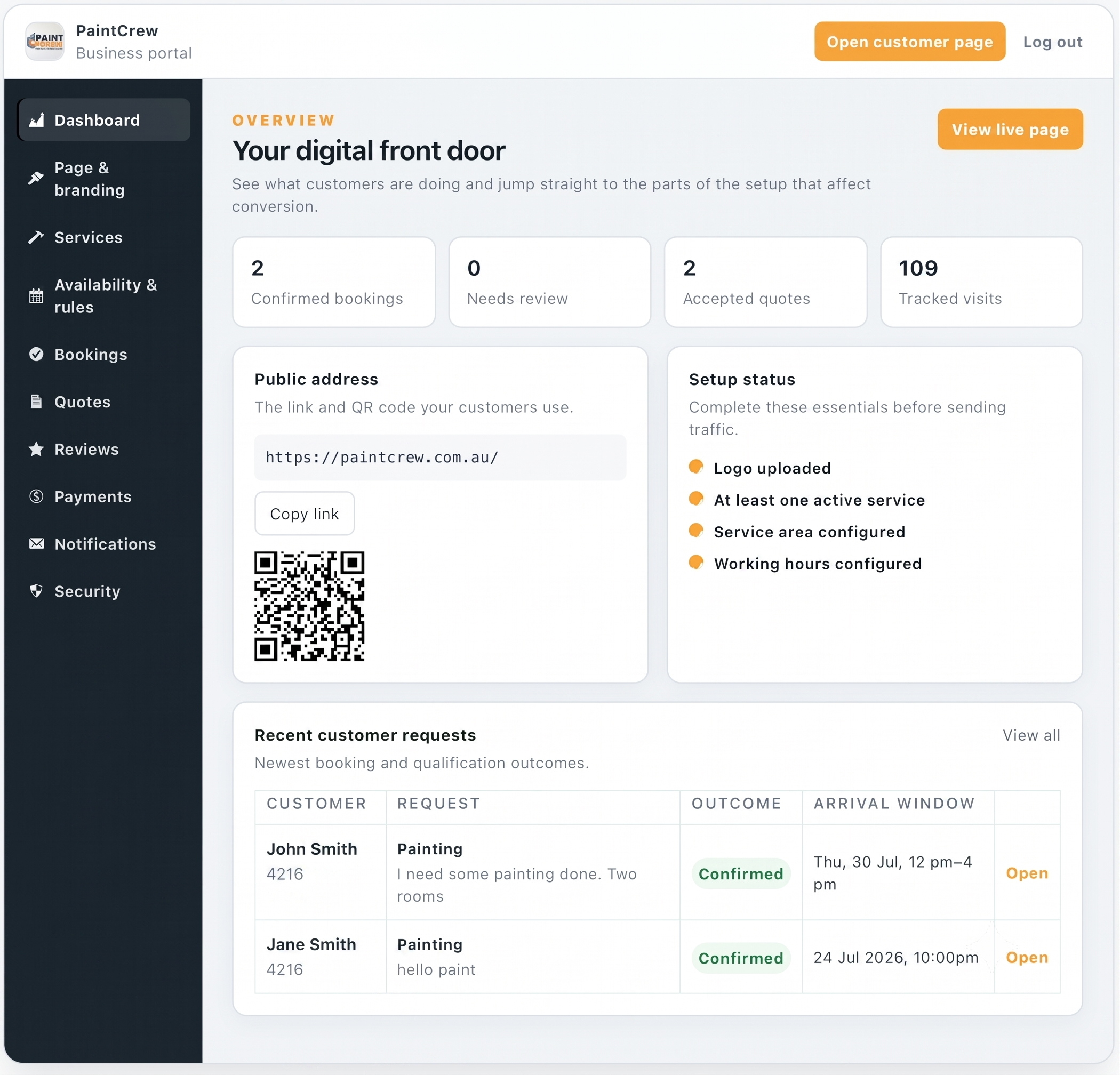
Business portal
The business can review customer requests, bookings, quotes and tracked Front Door visits.
Try the customer-facing journey.
Open PaintCrew inside this article or visit the demonstration in a separate browser tab.
PaintCrew is a BrandUte demonstration using sample customer and transaction information.
Google Business Profile booking questions
Does Google Business Profile guarantee bookings?
No. A Business Profile can help customers discover and evaluate a local business, but bookings depend on visibility, customer demand, reviews, relevance, the destination experience, pricing, availability and business response.
Should my website link go to the homepage or booking page?
Use the destination that best matches the likely customer intent. A homepage may be suitable where substantial research is required. A focused Front Door may be stronger where most visitors are ready to select a service, request a quote or book.
Can I add a booking link to Google Business Profile?
Eligible profiles can add appointment or booking links. Google currently allows multiple links within supported categories and lets the business select a preferred link. Eligibility and available link types vary by business and region.
Does Google count bookings completed through my own website?
Google states that its Business Profile completed-bookings metric requires bookings managed through a supported booking provider. A booking completed through a self-hosted destination should be tracked using the business’s own analytics, booking records or portal.
Can I use a BrandUte Front Door as my Business Profile website link?
A business can use a valid direct destination that accurately represents the business and complies with Google’s business-link policies. The link should work, identify the business clearly and lead customers to the relevant service or action.
Should I add UTM parameters to the Business Profile website link?
Campaign parameters can help analytics identify visits originating from the Business Profile. Use a simple and consistent naming structure, then confirm that the destination and any redirects preserve the parameters.
Does Google Business Profile still have customer chat?
No. Google discontinued Business Profile chat and call-history features on 31 July 2024. Customers can still call the business and use its website and eligible booking links.
Should every tradie offer instant online booking?
No. Instant booking works best for sufficiently standardised services. Complex, high-value or diagnostic jobs may require a qualified quote request, photographs, inspection or callback before scheduling.
Can I keep my existing website?
Yes. The existing website can retain service information, projects and search-focused content. Its calls to action can connect to a BrandUte Front Door, or selected Google traffic can be directed to a more focused destination.
What should I measure each month?
Review profile searches, views, calls, website clicks and directions where available. Then measure destination visits, completed enquiries, qualified requests, confirmed bookings, accepted quotes and the value of work won.
Continue improving the direct customer channel.
Tradie website vs booking Front Door
Understand the difference between helping customers research and guiding them towards a useful action.
Read the guide →Shared leads vs owned enquiries
Compare marketplace opportunities with enquiries arriving through the business’s own Google presence, reputation and domain.
Read the guide →BrandUte vs hipages
Compare access to shared marketplace leads with a direct customer Front Door under the individual business’s identity.
Read the comparison →Turning Google Business Profile visits into bookings requires both trust and action.
Start with an accurate, verified and trustworthy Business Profile.
Then ensure the website or booking link leads to a destination that:
- identifies the business immediately;
- works properly on mobile;
- shows the main services and coverage;
- provides a clear primary action;
- asks only useful qualification questions;
- matches the action to the type of job;
- explains whether the booking is confirmed or awaiting review;
- notifies the business promptly;
- tracks the original Google source; and
- measures confirmed work rather than clicks alone.
Google Business Profile helps the customer find you. The booking journey decides whether they stop looking.
Official Google information used in this guide
This guide was reviewed on 23 July 2026. Google Business Profile features, metrics, eligibility and interface options can change. Confirm important setup details through the current Google Business Profile interface and official documentation.
- Google: About Google Business Profile
- Google: Manage Local Business Links
- Google: Set Up Bookings Through a Provider
- Google: Business-Link Policies and Guidelines
- Google: Understand Business Profile Performance
- Google: Changes to Business Profile Chat and Call History
- Google Analytics: Collect Campaign Data With Custom URLs
- Google Analytics: Connect Google Business Profile